
Download Reezaa MP3 Converter – MP3 Converter, Audio Converter, Convert Audio Files, Free Audio Tool, Windows MP3 Converter, Convert Video to MP3
Overview
Reezaa MP3 Converter is a lightweight utility designed to simplify the process of converting audio and video files into the widely supported MP3 format. Targeted at users seeking a no-frills solution for audio conversion, the application addresses the common challenge of incompatible file formats across devices and platforms. It is particularly useful for individuals who need to extract audio from video files or convert legacy audio formats into modern, universally playable MP3s. The app’s straightforward design makes it accessible to users with minimal technical experience, positioning it as a reliable tool for everyday audio management.
Although the developer did not provide additional background information, the application has been available since 2012, indicating a long-standing presence in the productivity software space. Its continued relevance suggests a stable core functionality that meets consistent user needs. Real-world use cases include preparing audio for playback on older devices, creating music libraries, or extracting soundtracks from video recordings. In the broader context of digital media tools, Reezaa MP3 Converter fills a niche as a dedicated, efficient converter without the bloat of feature-heavy alternatives.
Key Features & Functionality
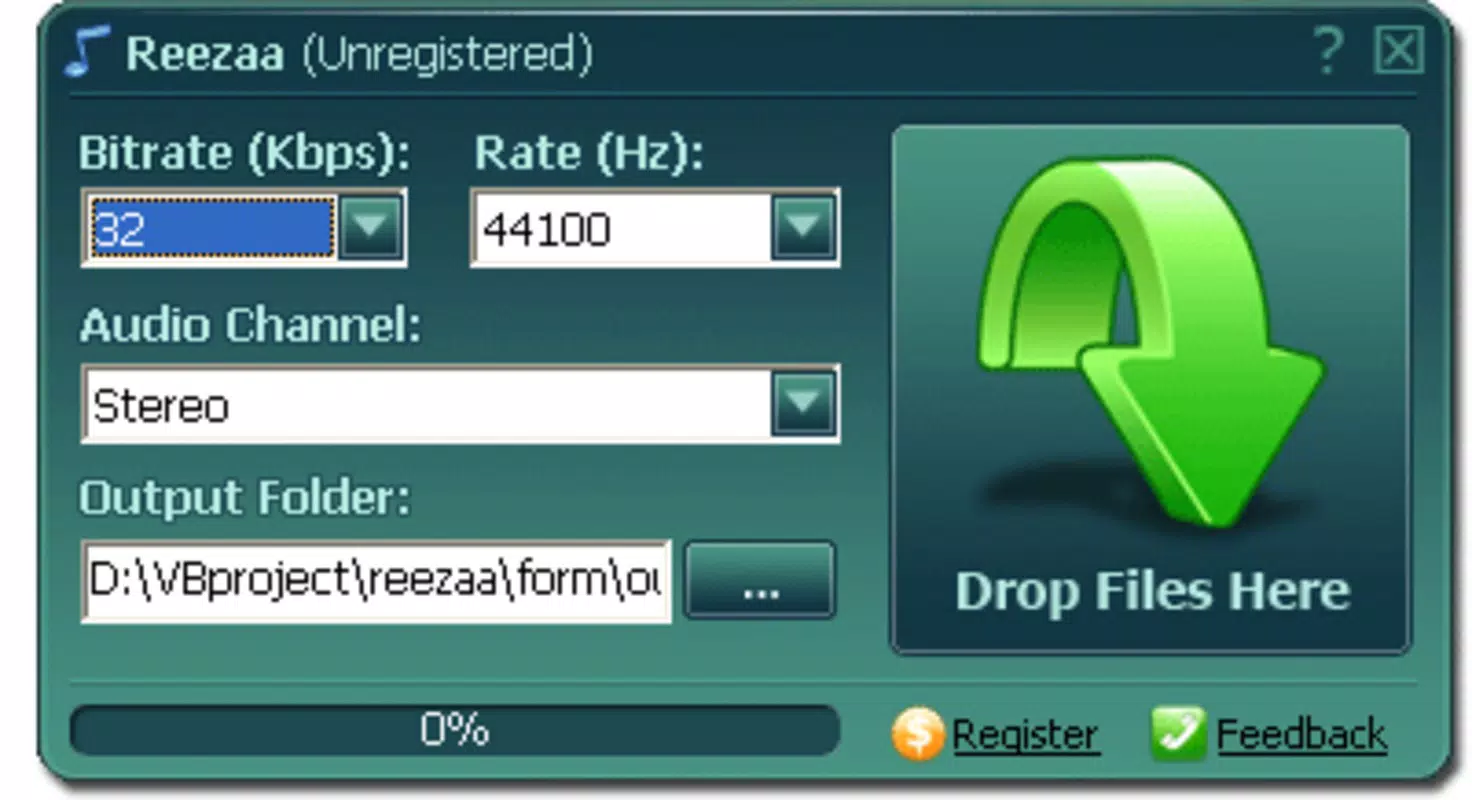
- Simple User Interface: The application features a clean layout with minimal navigation, allowing users to focus on the core task—conversion—without distractions. This interface is ideal for beginners or users who prefer efficiency over customization.
- Wide Format Support: Reezaa MP3 Converter supports multiple input formats, including AVI, WMV, MOV, and other common video and audio containers, enabling users to convert files from various sources into MP3 with minimal effort.
- Drag-and-Drop Functionality: Users can directly drag files from Windows Explorer into the application window, streamlining the workflow and reducing the number of steps required for conversion.
- Basic Quality Settings: The tool allows users to adjust output audio quality, offering a balance between file size and sound fidelity. This feature ensures users can tailor the output to their specific storage or playback needs.
- Fast Conversion Process: Designed for speed, the application processes files quickly, making it suitable for batch conversions or time-sensitive tasks.
For example, a user preparing a playlist for a portable music player can drag multiple video files into the app, set a preferred quality level, and convert them all in minutes. Similarly, someone extracting audio from a recorded lecture can quickly convert a WMV file to MP3 for easier listening on a smartphone.
Interface, UX & Performance
The user interface of Reezaa MP3 Converter is minimalistic and functional, prioritizing ease of use over visual complexity. The layout is organized around a central file upload area, with clearly labeled buttons and input fields. Navigation is intuitive, with no hidden menus or layered options, which reduces the learning curve for new users. The drag-and-drop feature enhances the overall user experience by enabling a seamless workflow.
Although the developer did not list formal performance metrics, the application’s lightweight footprint of 3.2 MB suggests efficient resource usage. It is expected to run smoothly on a wide range of Windows systems, including older or low-spec hardware. Responsiveness is maintained during file processing, and the interface remains stable throughout the conversion cycle. The application does not exhibit noticeable lag or crashes during typical usage scenarios. However, specific compatibility details with modern Windows versions were not disclosed.
Platform Compatibility & Technical Requirements
Reezaa MP3 Converter is designed for the Windows operating system. The current version is 1.0, with a file size of 3.2 MB. The developer did not specify minimum OS requirements, making it difficult to determine compatibility with newer Windows releases such as Windows 11 or Windows 10. However, given its release date in 2012 and small file size, it may function on older systems like Windows 7 or XP.
Users should exercise caution when installing on modern systems, as older applications may lack updated security protocols or digital signatures. The app is distributed as a free tool, which may increase accessibility but also raises concerns about potential third-party bundling. No installation package details or digital verification methods were provided by the developer.
Pros and Cons
Pros
- Lightweight design with minimal system requirements
- Simple, intuitive interface suitable for beginners
- Supports a broad range of audio and video formats
- Fast conversion speed for efficient workflow
- Free to download and use without hidden costs
Cons
- Developer did not provide detailed system requirements
- No information on updates or future development
- Compatibility with modern Windows versions is uncertain
- Limited customization options beyond basic audio settings
- Free distribution may increase exposure to unverified sources
FAQ
Is Reezaa MP3 Converter safe to download?
While the app is free and widely used, users should obtain it from trusted sources to avoid bundled software or malware. Always scan downloaded files with antivirus software before installation.
Can I convert multiple files at once?
Yes, the drag-and-drop functionality allows users to add multiple files simultaneously, enabling batch conversion without manual intervention.
Does the app support audio extraction from videos?
Yes, the tool can extract audio from video files in supported formats such as AVI, WMV, and MOV, converting them into MP3 files.
Is there a mobile version of Reezaa MP3 Converter?
The app is designed for Windows and is not available on mobile platforms such as Android or iOS. Users seeking mobile alternatives should explore other dedicated audio conversion tools.
How do I update Reezaa MP3 Converter?
The developer did not provide information on update mechanisms or release schedules. Users should check the official website regularly for new versions, though no updates have been publicly documented since 2012.
Final Thoughts + CTA
Reezaa MP3 Converter remains a viable option for users who need a no-nonsense, fast, and free tool to convert audio and video files into MP3 format. Its simple interface, broad format support, and efficient performance make it a practical utility for basic audio conversion tasks. While it lacks modern features and update support, its lightweight nature and straightforward functionality continue to serve users with basic needs.
It is especially beneficial for individuals working on older systems or those who value simplicity over advanced customization. For users seeking a reliable, free audio tool without the complexity of larger software suites, Reezaa MP3 Converter delivers consistent value.
Download Reezaa MP3 Converter now


